Showing posts with label xperia x10 gps and navigation. Show all posts

Wednesday, January 26, 2011

BigPlanet for xperia x10


BigPlanet is an advanced map application with next features: work in offline mode(without network connection), zoom by double tap, bookmarks, different map sources(OpenStreet, Google Maps), save(cache) map in given radius for use in offline.

Download here for xperia x10

AndTripLog


Android gps application. Allow you to record your trip onto your device.Display current gps position time and speed.Export it by email and store it onto your sdcard at gpx format.


Download Here for xperia x10

plz do like and comment for this/.............!!!

3D Compass (AR Compass)


This app is an augmented reality 3D compass ★ Compass, reality view & map ★ Take/share screenshots ★ Multi-compass types ★ Auto rotate map ★ Heading and degrees ★ Current address ★ Speed, run time ★ Fast bright with one tap "3D Compass Pro" removes Ad and has more functions Recent changes: ★ show current date and time ★ new preference option to ignore compass when taking a screenshot ★ show complete address information new icon ★ fixed crash errors


Download here

Monday, January 24, 2011

Moov


Quickly search for anything on your phone


Moov


The Android interface looks great but navigating your stuff using the operating system can still take some time.
Step forward Moov, a free app that lets you quickly find, then instantly open, programs, contacts and settings. All you need to do is start typing what you want to find, directly from your home screen, and Moov will display the most relevant results as you type. Then just hit where you want to go and you'll be taken there instantly.
The great thing about Moov is that it doesn't just search your hard drive. It also integrates...
Read more
Pros
  • Lightweight, doesn't slow your phone down
  • Makes searching for apps, contacts and settings much quicker
  • Integrated web services searching
  • Clear, at-a-glance list view


Cons
  • Takes a while to grow accustomed to


Sherpa


Description:
Sherpa - Discover your world v1.0.4 - All-in-One Guid, free android apps, htc android free apps:

T-Mobile Recommends - Sherpa discovers information about your surroundings. Learning your likes and dislikes, the app automatically displays surrounding restaurants, retailers and attractions that reflect your taste. Drill-down for location details, reviews and contacts. Sherpa, your indispensable all-in-one guide.

Preview Images:


DOWNLOAD HERE

Sunday, January 23, 2011

Locale

Custom Locale

Version: 0.7 updated
Platforms: Android
Developer: inKa 

Distribution Type:
Freeware
File Size: 85 KbCustom Locale allows you to modify the Locale of your Android phone to anything you like.
You can select a pre-defined Locale or create your own.


AndNav

AndNav2 is a FREE + fully featured Turn-By-Turn Navigation Application. It supports Location-Lookup, POIs, Text-2-Speech Instructions, Traffic-Feeds, Contact-Search, 4-day Weather Forecast, Via-Points, Avoid-Areas, and many more...

Please respect that it is a Beta Version.


Download Here


The Weather Channel


The Weather Channel takes your weather experience to the next level with animating radar, hourly & extended forecasts, severe weather alerts,& more.


*Interactive maps
*Widgets
*Track your weather via status bar


With your consent TWC does track location to provide you with accurate wx information


Package: com.weather.Weather


Tags: the weather channel, weather channel app gone from market, weather channel app android, android weather channel app directions, el weather channel, ... 

The Weather Channel Screenshots

The Weather Channel for Android screenshot The Weather Channel for Android screenshot


Use a QR code scanner

  1. Open your prefered QR code scanner (learn more about this).
  2. Point your phone camera at the QR code below and scan it (click the QR Code to enlarge).
  3. Follow the onscreen instructions to proceed with the installation.

Wednesday, January 19, 2011

Google Maps 5.0.0 for Xperia X10

Get Google Maps with Navigation (Beta), Places, and Latitude. Use Google Maps on your phone, and never carry a paper map again. 

Google Maps features: 
- Navigation: Free, voice-guided GPS navigation system using Google Maps and GPS 
- Places: Search for nearby places and see place hours, reviews, etc. 
- Latitude: See friends on the map 
- Voice Search 
- directions 
- Traffic 
- Street View 

Features: 
- My Location 
See your location on a map, even if you don't have GPS. 
- Buzz 
View what's happening nearby at a glance. 
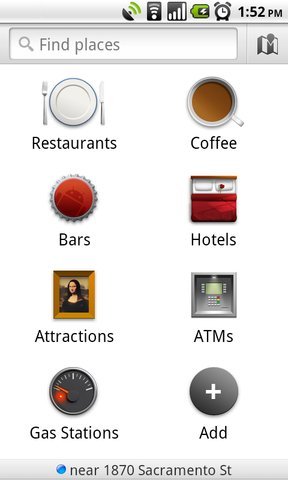
- Places icon New! 
Find nearby places with the Places icon in your app launcher. 
- Place Pages 
Search for any business or place to find listing info, pictures, reviews & ratings, and more rich details. 
- Navigation (Beta) 
Get turn-by-turn GPS navigation with voice output for driving or walking directions. 
- Driving directions 
Thanks to My Location, you don't even have to enter your starting point. 
- Transit directions 
Get routes and schedules to travel via subway, bus, or on foot. 
- Latitude 
See your friends' locations and share yours with them. Start Maps and then select "Join Latitude." 
- Biking directions 
Get bicycling routes and see available lanes or trails with the Bicycling layer. 
- Street View 
View street-level imagery of businesses and turns in directions. 
- Layers 
Overlay layers on the map (e.g. Traffic, Satellite, search results, and more). 
- Traffic 
Real-time traffic helps you find the fastest route. 

Recent changes: 
- Explore the map in 3D. Two finger drag down/up to tilt; twist to rotate on supported devices. 
- Use compass mode to rotate the map to where you're facing. Center the map with My Location then tap again. 
- Improved map caching and offline Navigation rerouting if you lose your connection.